New in QwikTeach: let students hear their own pronunciation progress
By Lucas Weaver, Founder of QwikTeach
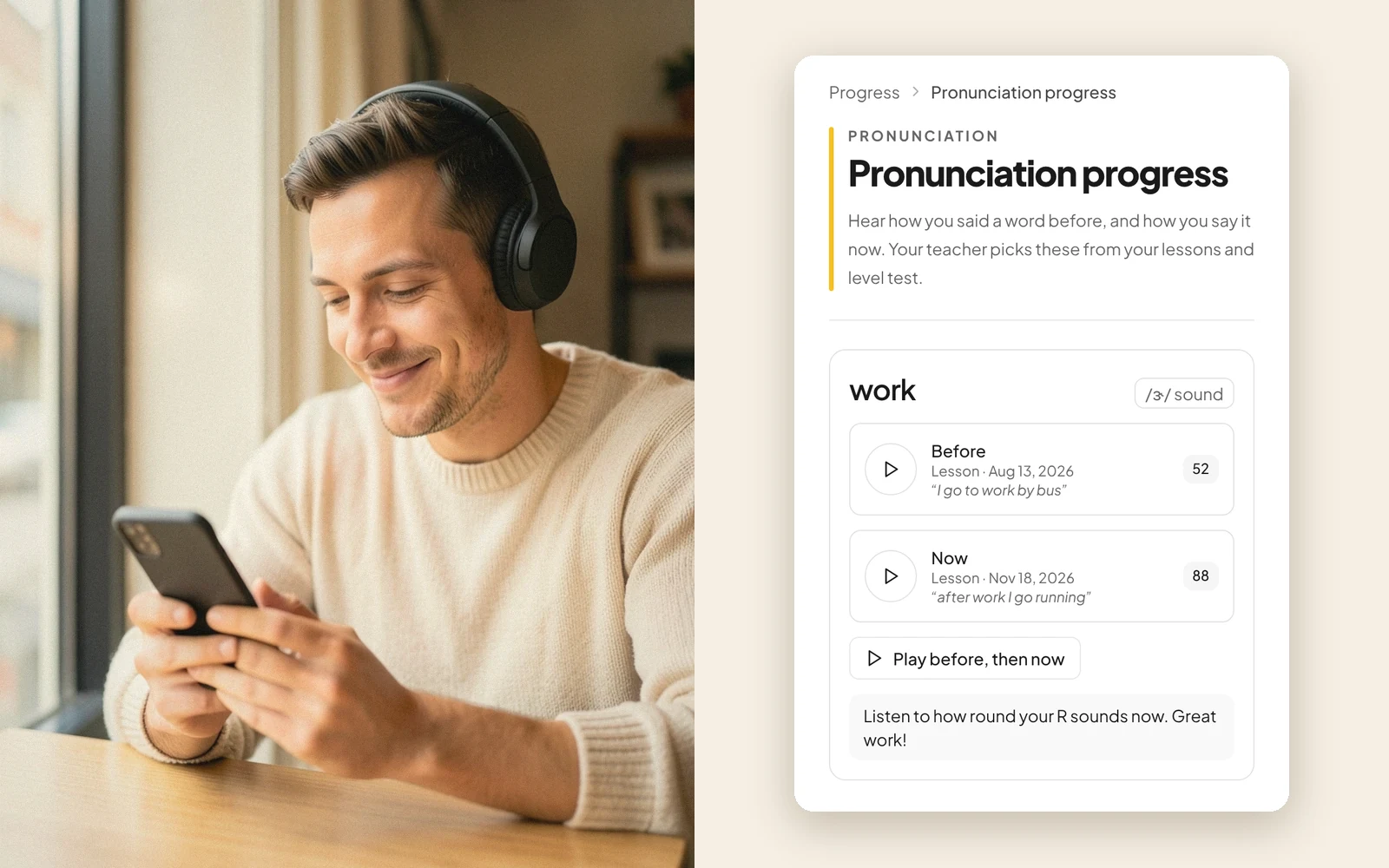
Your students can now hear how they said a word months ago, then how they say it today. QwikTeach finds the pairs in your recorded lessons, you approve the ones that show real progress, and your student plays them on a new Pronunciation progress page.
It's available now for lessons recorded in the QwikTeach classroom.
Why students miss their own progress
Pronunciation progress is easy to hear from the teacher's chair. From the student's chair, it's almost invisible.
I've coached pronunciation for more than 10 years, first in Spain and the Netherlands and now online. My method, Pronunciation Physics, starts from one rule: every sound is a movement. A student's first language trained their mouth for its own sounds, and English needs different movements.
So we learn the movement, exaggerate it, repeat it until it comes out right, and bring it back in later lessons. That retraining takes weeks.
The student lives inside those weeks. They hear today's slip, not the version from August.
That's why I started pulling old clips for my own students. QwikTeach now does the digging for you.
Let QwikTeach find the words worth comparing
You don't pick sounds or words. After each recorded lesson is scored, QwikTeach looks for candidates in this order:
- Corrected in class. Words you corrected as mispronounced, either caught live or found in the lesson analysis.
- Drilled in class. Words repeated 4 or more times within a minute, which is what a drill looks like in a recording.
- Weak sound. Words that contain the student's weakest measured sounds.
For each word, it listens for the sound the student scores lowest on. Every suggestion carries a label that says why it was picked.
If the student took a level test in QwikTeach and said the same word there, the level test becomes the earliest "before."
Approve what your student sees
Nothing reaches your student until you approve it.
Open a student and choose Pronunciation progress, or get there from their Pronunciation Lab. Each suggestion shows the word, the sound, a Before clip and a Now clip with the sentence each one came from, and a score out of 100 for that sound.
- Select Play before, then now to hear both in a row.
- If a clip isn't the clearest one, switch to another take from a different lesson.
- Add a short note, such as what to listen for.
- Select Approve to show it to your student, or Dismiss to drop it.
New lessons are checked automatically. To look right away, select Find new words.
One limit: older recordings sometimes mixed up who was speaking. If a take turns out to be your voice, pick another take or dismiss it. Lessons recorded since mid-November keep the student's audio on its own track, which helps QwikTeach tell your voice from theirs.
What your student hears
Your student finds Pronunciation progress in their sidebar and on their Progress page. It shows only the pairs you approved, with your note under each one.
They play the old take, then the new one. In their own voice.
Try it after your next lesson
- Teach a lesson in the QwikTeach classroom with recording on.
- Open the student and choose Pronunciation progress.
- Approve one pair that shows real progress, and add a note.
A good first test: pick a word you drilled last month and play the pair without saying what changed. If your student hears the difference on their own, the movement is sticking.
Open QwikTeach and check a student's Pronunciation progress, or see how it works if you're new to QwikTeach.

About the Author
Lucas Weaver
Lucas is the founder of QwikTeach and a longtime language teacher who built the product from firsthand experience of the work surrounding every lesson. His focus is helping teachers feel more prepared, more consistent, and less buried by admin.